5098 Posts in 1518 Topics by 1115 members
| Go to End | ||
| Author | Topic: | 6501 Views |
-
Re: Custom Styles in TinyMCE

26 March 2010 at 7:27am
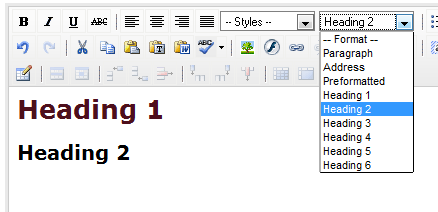
Using this tip, I was able to get the styles (from both the "Styles" and "Format" drop downs) to appear in the content area of the TinyMCE WSYWIG. However, I can't seem to get the actual styles to appear in the dropdown menus themselves; I would assume the option in the drop down for "Heading 1", for instance, would carry the same styling.
The goal can be seen in TinyMCE's full demo:
http://tinymce.moxiecode.com/examples/full.phpThe attachment shows what I am seeing right now. Headings 1 and 2 show up as I have defined them in typography.css within the content area - but not in the drop down. (The screenshot doesn't show it, but its the same with the "Styles" drop down.)
I've tried a few different implementation methods of adding styles to the editor, but none seem to solve this specific problem.
Am I missing something?
-
Re: Custom Styles in TinyMCE

9 October 2010 at 7:35am Last edited: 9 October 2010 7:37am
Greetings
I have followed the suggestions in this thread and still I am not getting any styles in the drop down menu. They were there for a little while and then suddenly disappeared. I can't figure how to get them back.
I added this
HtmlEditorConfig::get('cms')->setOption('content_css', 'cms/css/editor.css, themes/metaformia/css/editor.css');
to _config.php and it did not work even after I flushed and cleared the browser.
Thanks.
Xochi -
Re: Custom Styles in TinyMCE

5 December 2010 at 12:01pm Last edited: 5 December 2010 12:05pm
Update:
A ran into this question too at first. Chrome has an extra dropdown in the clear cache dialog, so make sure you set it to "Everything" and not "Older than 1 hour" which is what it is by default. This is what got me.
In 2.4.3 it seems to require nothing special. Just add the styles in typography.css.
Suggestions on how to use this feature in a way that is helpful for clients:
This is very powerful and flexible to use this in a simple way by just adding one attribute or color. For example,
.typography .orange
{
color : orange;
}.typography .italic
{
font-style : italic;
}Then the user can apply it to an h2 (that may normally be grey) to make it orange, or to a <p> tag, or even a single word or phrase (in which case a <span> tag is created). This is very handy for users that like flexibility. They can use it to override your current settings for individual elements. My clients have really loved it when I use the styles dropdown in this way.
Feature request / Idea:
I'd love to have a way to include some styles and not others. There are some things I'd like to have in typography.css to use in the site, but not necessarily expose to the end user. Anyone got any ideas? -
Re: Custom Styles in TinyMCE

11 January 2011 at 2:09am
Hi,
I'm using Webdeveloper Toolbar in Firefox and Cache is set to "deactivate cache" tried a devbuild and everything else mentioned here, but my styles won't appear. Could it be because I'm using german as language?
I can see the set_option uses "'body_class' => 'typography'," in /cms/_config.php and the typography.css is loaded with my classes. But nothing appears in the editor.
My css is this:
/* custom typography in tinymcd */
.footnote {
font-size: 10px;
}.typography .orange {
color : orange;
}.typography .italic {
font-style : italic;
}I only need footnote, but added yours to see if there needs to be a .typography class up front.
-
Re: Custom Styles in TinyMCE

16 February 2011 at 2:49pm Last edited: 16 February 2011 2:57pm
Hi Artyom,
editor.css pulls in all the styles from typography.css so in order to have certain typography styles in the front end but not the editor,
all you'd have to do is move any styles that you do not want showing in the styles dropdown out of typography.css and place it in any other css file that gets included in the front end site. For example, you could create a new css file such as hiddenstyles.css (be sure to do a Requirements::css('path/to/hiddenstyles.css) include in the init function of your Page controller or simply include it in the relevant .SS file.Then if you put the specific .typography styles in there, it will render in the front end and not show in the editor style dropdown for the client.
Hope that helps...
D-L
-
Re: Custom Styles in TinyMCE

30 March 2012 at 4:47am
Hey,
I just downloaded the latest version of silverstripe and tried to add a customer style. It's definitely loaded because I can manually add it through the HTML option on tiny mce but even when I clear the cache it's still not in the styles drop down menu on the editor. I've tried Chrome and Firefox - flushed the caches on both, in Chrome: making sure 'clear the cache' is ticked and selecting 'from the beginning of time' on Chrome. Still nothing.
Also, I notice that in typography I've got styles for h1 to h6, but in TinyMCE only h1 to h3 are available.
Where am I going wrong?
| 6501 Views | ||
| Go to Top |