21295 Posts in 5734 Topics by 2602 members
|
Page:
1
|
Go to End | |
| Author | Topic: | 2019 Views |
-
Need help with recaptcha Instalation

11 August 2009 at 12:39pm
Maybe I am an idiot, i will admit it. But i am completely lost as to how to install recaptcha. Some kind of walkthrough tutorial in the module section would be nice.
I know I have to update certain files, but even those instructions are confusing at best. If anyone who got recaptcha to work can please take a few moments to add a small tutorial, i know I would not be the only grateful one.
Also, I know people are having issue with mollum, i as well, but which spam filter do you all prefer most and why? Just curious to your thoughts!
-
Re: Need help with recaptcha Instalation

9 December 2009 at 3:30am
Hi guys,
I installed recaptcha on my local Dev using these steps, so this may help you.
NOTE: there are some intermediate steps that may or may not effect other parts of your site, so it is best to test this first. Also, make sure you have the appropriate CMS version. I believe the minimum is 2.3.2.
1. Download and install from Modules: SpamProtector
1b. extract or copy the folder "spamprotector" into your CMS root. You may need to rename the folder slightly by taking off the version number.
1c. rebuild the database
2. Download and install from Modules: ReCaptcha
2b. extract or copy the folder "recaptcha" into your CMS root. You may need to rename the folder slightly by taking off the version number.
2c. rebuild the database
3. For the firefox fix, add a closing tag for the input HTML (around line 171) in file: recaptcha/code/RecaptchaField.php
3b. For the FF fix, remove the xml declaration at the top of the templates, page.ss and make sure it is declaring xhtml: <?xml version="1.0" encoding="UTF-8"?>
4. Go to http://recaptcha.net/ and log in OR sign up for a new account.
4b. Create keys for your site's domain.4c. Insert the code for the keys into the ReCaptcha _config file. i.e.
RecaptchaField::$public_api_key = '<your public key>';
RecaptchaField::$private_api_key = '<your private key>';5a. In your mysite _config file, add the following line:
SpamProtectorManager::set_spam_protector('RecaptchaProtector');5b. Visit the page where your form is and ?flush=1. You should see the working recaptcha field amongst the default form.
Hope this has helped.
-
Re: Need help with recaptcha Instalation

9 December 2009 at 12:46pm
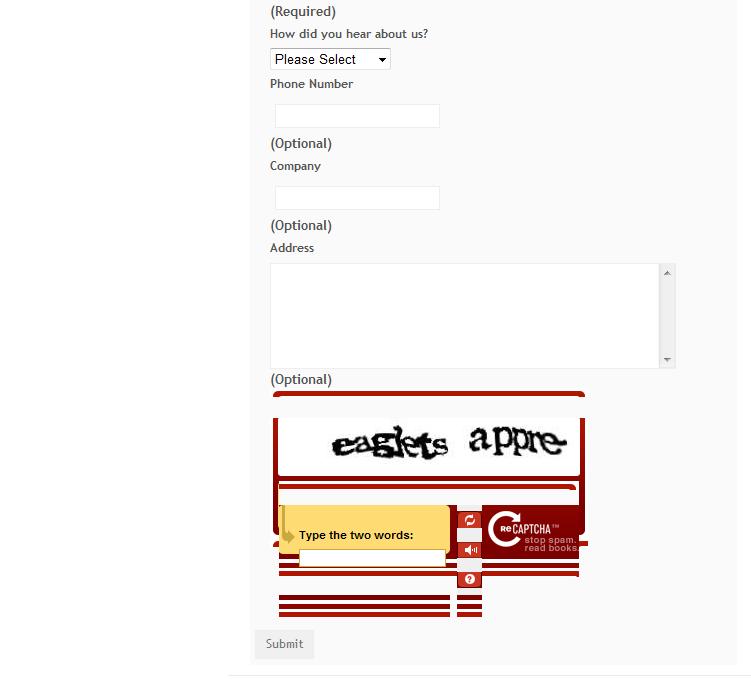
Thanks that helped me a lot too! However, I can not get FF or chrome to see the captcha unless I use ?flush=1.
It shows up t in IE but the formatting is all messed up. I have already added the / to close the html tag.
I guess that is a css issue but maybe not..... I attached an screen shot. It appears this way in all browsers.
-
Re: Need help with recaptcha Instalation

10 December 2009 at 3:33pm Last edited: 10 December 2009 3:35pm
I'd say this is more likely a CSS issue.
The recaptcha form adds its own embedded styles which format the majority of the table. You are receiving this styling, so I'd say there is an overiding factor.
I'd start debugging/disabling CSS style sheets as a test and see what is effecting your table.
Also, check your doc-types being declared. When I was having issues with FF, it is because the wrong doc-type throws an error for the page, even though the source HTML is available. IE basically ignores this error and continues to render.
-
Re: Need help with recaptcha Instalation

7 April 2010 at 4:37am Last edited: 7 April 2010 7:36am
Can anyone confirm that recaptcha and spamprotector are 2.4 ready?
And if not did anyone manage to implement recaptcha without these modules?
RE-EDIT: got it to work, there is something missing from the above explanation:
You also need to insert a certain code into your form.
In my original ContactPage it was like this:
return new Form($this, 'ContactForm', $fields, $actions, $validator);
I changed it to this:
$form = new Form($this, 'ContactForm', $fields, $actions, $validator);
$protector = SpamProtectorManager::update_form($form, 'Comments'); // to make the recaptcha work with your form
return $form;
It does not only appear, it also works on my site
| 2019 Views | ||
|
Page:
1
|
Go to Top |