
We’re back with another Silverstripe CMS release. Silverstripe CMS 6.2.0 comes jam-packed with quality of life improvements (you can filter campaigns and archived records now), accessibility improvements, and a bunch more.
This release includes a patch for a medium severity security vulnerability, which was also backported to CMS 5.4 and 6.1. If you can’t upgrade to CMS 6.2.0 right away, we recommend at least upgrading to the latest patch of the current release your projects are tracking.
Accessibility improvements
This release includes a bunch of accessibility improvements, ranging from improved keyboard support and a better screen reader experience to increased contrast. Full details are in the changelog.
There’s still more work to be done, and CMS 6.3 will include even more accessibility improvements in October.
Unsaved changes indicator
Currently if you’re editing content in the CMS, the only indication you have of unsaved changes is a change in colour for the “save” and “publish” buttons. This is pretty easy to miss, and doesn’t give any indication of just how much content you’ve updated since you last saved.
Imagine you’ve written a lot of new content, and suddenly your power cuts out or your session expires - and you lose all of that work.
To help mitigate this problem, we’ve added a new indicator in the CMS to let you know how long it’s been since you started making those changes.

By default, this will appear 5 minutes after you start editing content, and change to a more prominent “warning” after another 5 minutes, to help remind content authors to save their content more frequently.
Move elemental blocks
If you use the dnadesign/silverstripe-elemental module, now you can move elemental blocks from one parent record to another. This is especially powerful in combination with the duplicate function, meaning you can duplicate a block and then move the duplicate to another page. No more recreating the same content again from scratch.
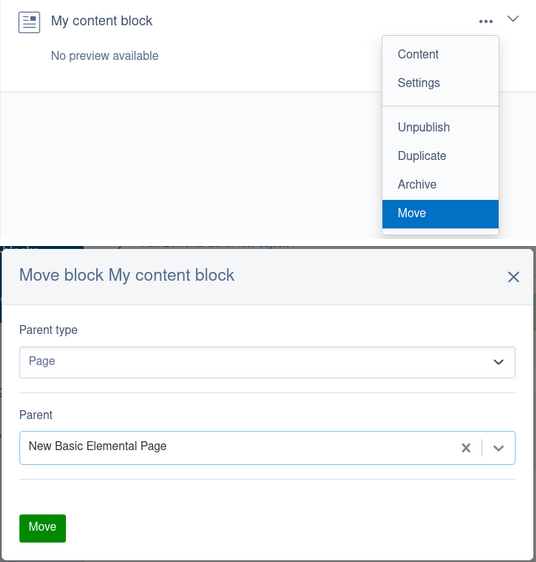
The form to select the parent record adapts to your project. For example if you only have one parent type that can have elemental blocks, the “parent type” field won’t display. And if the parent you’ve selected has multiple areas for elemental blocks, a dropdown field will let you select which area you want to move the block to.
Automatic retries for queued jobs
The symbiote/silverstripe-queuedjobs module now has the ability to automatically retry broken or paused jobs. This requires some configuration to set up so that the queued job service knows how many times to retry the job and how long it should wait before trying again - but once it’s configured it’ll just chug along in the background. This is really great for jobs that might fail sporadically, for example if they need to connect to some external service which encounters an outage.
Alongside this new feature, the form for viewing details of a given queued job has been improved with better logical structuring of fields and less overall visual clutter.
PHP 8.5 support
In keeping with our PHP support commitments, this release includes support for PHP 8.5. All supported modules can now be run on PHP 8.5 without issues.
Note that this doesn’t necessarily include third-party modules. If you maintain a Silverstripe CMS module, we encourage you to make sure it is compatible with PHP 8.5 and include that in your testing matrix.
Change in support for Silverstripe CMS 5
This release marks a milestone in the lifecycle for the Silverstripe CMS 5 major version series. Specifically, CMS 5.4 has now transitioned from “full support” to “partial support”.
In short, this means CMS 5.4 will no longer receive patches for regular bug fixes, nor patches for security vulnerabilities with a severity rating of medium or lower.
It will still receive security patches for vulnerabilities with a “high” or “critical” severity, which corresponds to a CVSS score of 7.0 or higher.
You can read more about the lifecycle of Silverstripe CMS releases in our release policy.
Keen to get your upgrade underway?
Talk to your Digital Agency or Developer about upgrading
Haven’t got a Developer or Agency? No problem! Browse the Silverstripe CMS Developer Network and filter by location to find a Silverstripe CMS Developer near you.
Or reach out to Silverstripe directly to upgrade your project.
Developers, check out our documentation
This release announcement does not cover the full details of what is included in the release. Be sure to review the full changelog before planning your next site upgrade.
