
We're back with another Silverstripe CMS release. Silverstripe CMS 6.3.0 lets content authors crop, rotate, flip and resize images without leaving the CMS. It also makes custom SingleRecordAdmin sections easier to give access to, and includes a big batch of security fixes.
This release includes fixes for 8 high severity and 11 medium severity security vulnerabilities. The high severity fixes were also released as patches for CMS 5.4 and 6.2, and the medium severity fixes as patches for CMS 6.2. If you can't upgrade to CMS 6.3.0 right away, we recommend at least upgrading to the latest patch of the release line your projects are tracking.
Image editing
Content authors can now make simple changes to images without leaving the CMS: crop, rotate in 90 degree steps, flip horizontally or vertically, and resize.
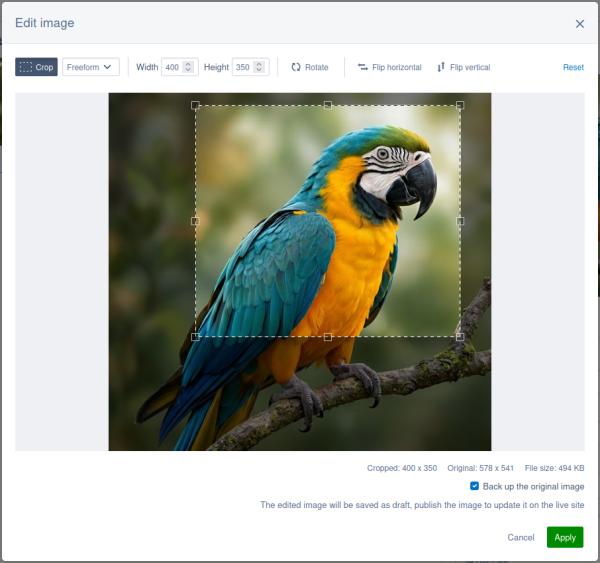
In the "Files" section, open an image, click the "Other actions" button (the three dots next to "Save" and "Publish") and select "Edit image".
The editor is for composition (where the subject sits in the frame), not retouching, so there are no brightness, colour or filter controls. Some other things to know:
- Edits replace the original file. Everything that already uses the image shows the edited version, so you don't have to update any links.
- You can back up the original first. The "Back up the original image" checkbox is ticked by default, and saves a copy of the original in the same folder before the edit is applied. If you untick it, there's no copy of the original to go back to.
- Edits are saved as a draft. The live site keeps showing the old image until you publish it.
- Resizing keeps the aspect ratio, and can only make an image smaller.
- Only raster images can be edited. SVG files can't.
To edit an image, you need permission to edit the image and to create files in its folder.
Developers can hook into the editor, for example to add a watermark to edited images. See the image editor documentation for the configuration options.
Permissions for SingleRecordAdmin sections
Until now, it was hard to give non-admin users access to a custom SingleRecordAdmin section. Unlike ModelAdmin sections, they didn't get their own CMS access permission, so only administrators could see them unless you wrote custom code.
Now each SingleRecordAdmin section gets a permission automatically, so you can give groups and roles access in the "Security" section, just like ModelAdmin sections. These permissions are not granted to non-admin users by default.
React form fields are now functional components
For developers: the React form field components in the CMS are now functional components rather than class components. This is part of our ongoing work to modernise the CMS front end.
For most projects you won't notice a thing. If your project extends one of these components as a class (for example extends TextField), switch to the Legacy-prefixed copy of the component for now. You'll need the latest version of @silverstripe/webpack-config to use it. The legacy components will be removed in CMS 7, so plan to move away from class inheritance before then. The changelog has the details.
Process limit for queued jobs run by Doorman
If you configured symbiote/silverstripe-queuedjobs to use the DoormanRunner by its '%$DoormanRunner' service name, Doorman previously ran job processes with no limit. That service name now gets the default rule, which runs one job process at a time. If you set properties on the DoormanRunner service name, move them to the Symbiote\QueuedJobs\Tasks\Engines\DoormanRunner service name, otherwise the queued jobs service fails with "Class DoormanRunner does not exist". This fix was also released in symbiote/silverstripe-queuedjobs 6.2.3. See the changelog for how to raise the limit or use your own rules.
Security fixes
High severity
- CVE-2026-91115 RCE via i18nTextCollectorTask writer parameter (silverstripe/framework)
- SS-2026-003 RCE via renamed uploaded file (silverstripe/assets)
- CVE-2026-88991 RCE in email subject field via template execution (silverstripe/userforms)
- SS-2026-001 Template injection RCE in userforms (silverstripe/userforms)
- SS-2026-006 Userforms RCE via email subject (silverstripe/userforms)
- CVE-2026-88990 RCE in email template field via template execution (symbiote/silverstripe-advancedworkflow)
- SS-2026-002 Template injection RCE in advanced workflow (symbiote/silverstripe-advancedworkflow)
- SS-2026-007 Advanced Workflow RCE via notification email template (symbiote/silverstripe-advancedworkflow)
These were released as patches for CMS 5.4 and 6.2. The exception is CVE-2026-91115, which was released for CMS 6.2 only because CMS 5.4 is not affected.
Medium severity
- CVE-2026-91112 CMS_ACCESS_SecurityAdmin privilege escalation (silverstripe/framework)
- SS-2026-004 Password reset token account takeover (silverstripe/framework)
- CVE-2026-91110 XSS using control bytes (silverstripe/framework)
- CVE-2026-91111 Uploaded XML XSS (silverstripe/userforms)
- CVE-2026-88987 XSS via XHTML data URI (silverstripe/framework)
- CVE-2026-88988 XSS via SVG data URI (silverstripe/framework)
- CVE-2026-91114 Stored XSS via unescaped permission in PermissionCheckboxSetField (silverstripe/framework)
- SS-2026-005 XSS in required field label (silverstripe/userforms)
- CVE-2026-91113 User-controlled ClassName allows unauthorized record type change (silverstripe/framework)
- CVE-2026-88992 Userforms CSV export restricted file access (silverstripe/userforms)
- CVE-2026-88989 Auth bypass GridFieldDetailForm (silverstripe/framework)
The fix for CVE-2026-91111 is in silverstripe/assets, so make sure you update that module as well as silverstripe/userforms.
These were released as patches for CMS 6.2 only. CMS 5.4 is in partial support, so it only receives fixes for high and critical severity vulnerabilities.
We're also disclosing CVE-2026-55186 Can bypass MFA during password reset flow in silverstripe/mfa. It only affects CMS 5, not CMS 6. This is an advisory only, and there is no fix, because the vulnerability is below the severity threshold for a release line in partial support. Upgrade to CMS 6 to resolve it.
CMS 6.1 reaches end of life with this release and does not receive any of these fixes. If you're on CMS 6.1, upgrade to CMS 6.3 or later.
Fixes from June 2026
CMS 6.3.0 also includes the fixes released as patches in June 2026:
- CVE-2026-54721 Remote code execution via userforms email subject (high severity)
- CVE-2026-54718 Remote code execution via advanced workflow email template (high severity)
- CVE-2026-54717 XSS in breadcrumbs in page listview (medium severity)
- CVE-2026-54720 XSS attack through media embed (medium severity)
- CVE-2026-55779 ArchiveAdmin XSS (medium severity)
The high severity fixes were released for CMS 5.4, 6.1 and 6.2, and the medium severity fixes for CMS 6.2.
Notification emails no longer render templates
Before this release, some email fields that authors edit in the CMS were rendered as templates. A CMS author could use this to run code on the server (CVE-2026-88991, SS-2026-001, SS-2026-006, CVE-2026-88990, SS-2026-002 and SS-2026-007). These fields no longer evaluate template syntax:
- In silverstripe/userforms, the email subject and email body of a user defined form's email recipient.
- In symbiote/silverstripe-advancedworkflow, the email body of a "Notify Users" workflow action.
These fields now replace a fixed set of merge variables and leave all other content as plain text. If your forms or workflows used other template logic in these fields, that logic no longer runs, so check them after you upgrade. You can still add your own variables with the updateMergeFields extension hook in userforms and the updateNotificationVariables extension hook in advanced workflow.
Flush required to protect the assets directory
The fix for SS-2026-003 hardens the .htaccess file that Silverstripe CMS generates in public/assets/. An existing project only gets the new rules after a flush. Most deployment processes flush, so for most projects this happens when you deploy. If yours doesn't, flush after you upgrade: run sake flush on CMS 6, or sake dev/build flush=1 on CMS 5. You can also load any page with ?flush=1 while logged in as an administrator.
The .htaccess file only applies to Apache. If you use another web server such as nginx, you need to set up the same protection yourself. See webserver configuration for the rules to use.
Action may be required for media embeds
The fix for CVE-2026-54720 removes all but a known-safe set of attributes, such as src, width, height and allow, from an <iframe> returned by an oEmbed provider when that iframe is added to the page as-is rather than wrapped in a sandbox. Removed attributes include event handlers, style and class. If this breaks a legitimate embed, you can exclude a provider you fully trust from sandboxing. See the changelog for how to do this.
Other changes that may need action
Some of the other security fixes change behaviour that your project may rely on. Check these before you upgrade:
- Dev task URLs ask for confirmation again. Opening a dev task URL such as dev/tasks/MyTask now shows a confirmation screen before the task runs, as it did in CMS 5. If a script or scheduled job requests dev task URLs, run the tasks with sake instead. See dev task URLs ask for confirmation again.
- i18nTextCollectorTask only accepts a Writer class name for its writer option. See the changelog.
- Groups that grant privileged permissions. A user without the ADMIN permission can no longer edit a group that grants ADMIN or APPLY_ROLES, including through a role or a parent group. See action may be required for groups that grant privileged permissions.
- XML and SVG data URIs are removed from HTML content when it is saved. An inline SVG image in existing content is removed the next time an author saves that record, so we recommend replacing it with an uploaded file first. See XML and SVG data URIs removed from HTML content.
- Protected files are served with a content disposition. Files served through PHP, such as draft files and silverstripe/userforms submission uploads, now download instead of opening in the browser, unless their content type is allowed inline. If you override FlysystemAssetStore.file_response_headers, add the new headers to your override. See protected files are served with a content disposition.
- Markup in silverstripe/userforms required field labels is no longer rendered. This only affects sites that set UserDefinedForm.required_identifier. See the changelog.
- Creating records through a GridFieldDetailForm enforces create permission. Saving a new record now returns a 403 response if canCreate() fails for the member. See the changelog.
Installing a release line in partial support with Composer
Composer 2.9.0 and later blocks package versions that have a published security advisory. A release line in partial support does not receive fixes for medium or low severity vulnerabilities, so once one is published every version in that line is flagged and Composer will not install or update to it. For example, installing CMS 5.4 fails on the medium severity fixes released only for CMS 6:
found silverstripe/cms[5.4.0, ..., 5.4.11] but these were not loaded, because they are affected by security advisories ("PKSA-pjvm-vnw2-n3m2").
To install anyway, tell Composer to ignore each advisory by its ID, with a reason. This means you accept the risk of running known, unpatched vulnerabilities, so review each advisory first. For example using composer 2.10+ for CMS 5.4 the following config can be used:
{
    "config": {
        "policy": {
            "advisories": {
                "ignore-id": {
                    "CVE-2026-54717": "XSS in breadcrumbs, not fixed in CMS 5.4. Risk accepted because ...",
                    "CVE-2026-54720": "XSS through media embed, not fixed in CMS 5.4. Risk accepted because ...",
                    "CVE-2026-55779": "XSS in archive admin restore, not fixed in CMS 5.4. Risk accepted because ...",
                    "CVE-2026-55186": "MFA bypass during password reset, not fixed in CMS 5.4. Risk accepted because ..."
                }
            }
        }
    }
}
The Composer error lists the ID of each advisory that blocks the install. Add each of these IDs, including any of the medium severity advisories from this release that affect your project.
ignore-id accepts either the CVE or the PKSA- ID from the error. For an advisory with an SS- ID, use the PKSA- ID. Ignoring by ID keeps Composer blocking any advisory you have not reviewed. The list grows as new medium or low severity vulnerabilities are published, and ignored advisories are left out of composer audit, so review it whenever you update. Upgrading to a release line in full support avoids this.
Keen to get your upgrade underway?
Talk to your Digital Agency or Developer about upgrading
Haven't got a Developer or Agency? No problem! Browse the Silverstripe CMS Developer Network and filter by location to find a Silverstripe CMS Developer near you.
Or reach out to Silverstripe directly to upgrade your project.
Developers, check out our documentation
This release announcement does not cover the full details of what is included in the release. Be sure to review the full changelog before planning your next site upgrade.
